Plaud: AI Note Taker
- 4.5
- Rating
- 500.00K
- Installs
- Free
- Price

 Analysis by App-foxy
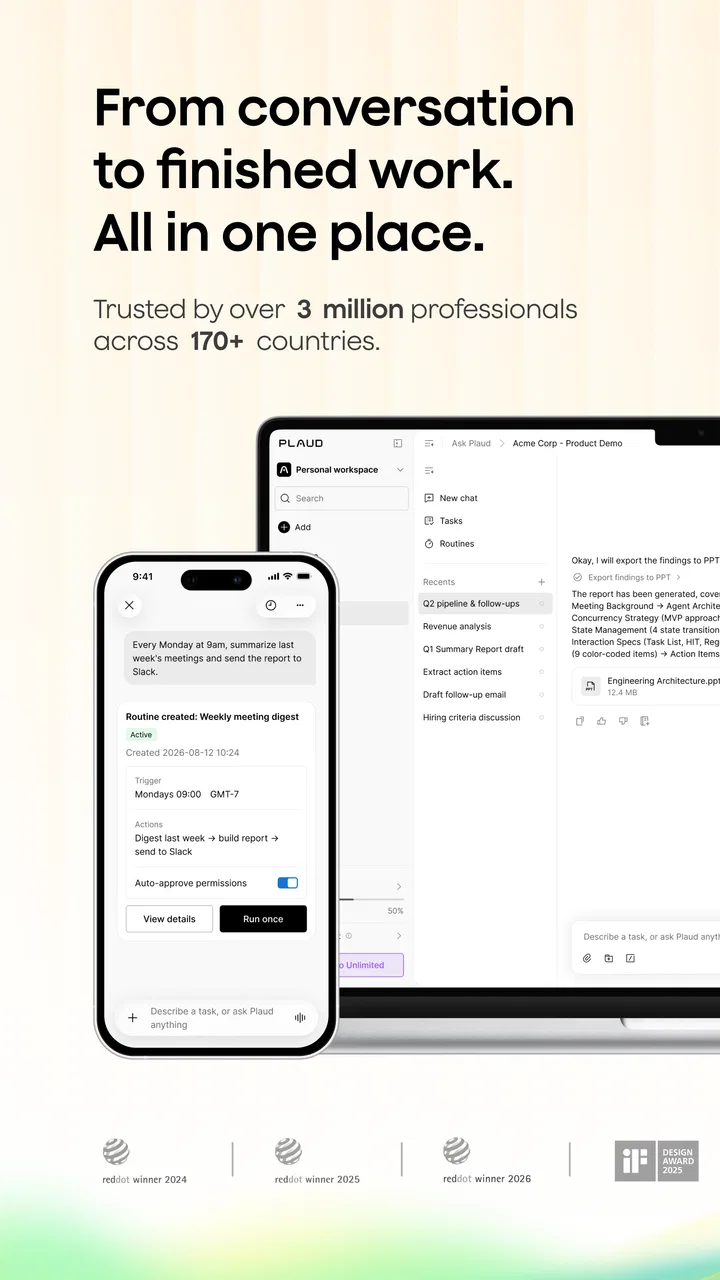
I often leave a conversation with several half-remembered points, a few hurried notes, and no clear idea of what needs to happen next. That is the recurring problem Plaud: AI Note Taker tries to remove. It is a free tools app from PLAUD LLC that turns recorded speech into a transcript and then organizes the material with AI-generated summaries. In my experience, its value is not simply that it writes down more words than I could type. The real benefit is having a searchable record and a faster way to turn a long conversation into useful notes.
The app is aimed at people who regularly deal with meetings, interviews, lectures, consultations, voice memos, or personal planning. It is available to users rated Everyone, and it runs on Android devices using version 7.0 or later. The current version is 3.28.0. I would not treat it as a replacement for careful listening or human editing, but it can remove a surprisingly large amount of repetitive work when the alternative is trying to remember everything afterward.
How Plaud fits into a real note-taking routine
I find the most useful way to judge Plaud is to look at what happens after a conversation, not just at the transcript it creates. In this section, I focus on the small choices that make captured material easier to retrieve and act on later, especially when a recording contains several threads. That practical routine also makes it easier to see where the app’s strengths end and human review still matters.
You May Also Like

 Blood Strike: 2.5 Anniversary
Blood Strike’s Loadouts Turn Every Drop Into a Tactical Gamble
A close look at Blood Strike’s custom loadouts: how fast access to signature weapons reshapes its battle royale rhythm, rewards preparation, and narrows the gap between fights.

 Pandora - Music & Podcasts
Pandora’s Music Is Easy to Start, but Harder to Recover
Pandora’s strength is its low-effort path from a seed to a station. Its weak spot is how much confidence it asks you to place in connection, setup, and quiet recovery.

 8 Ball Pool
 Is Built on Rivalries, Rematches, and Routine
A close look at the rivalries, rematches, shared routines, and unanswered safety questions that turn a quick pool match into a persistent mobile community.

 Samsung Music
’s Quiet Strength Is Playing What You Already Own
Its reach comes less from spectacle than from dependable access to a personal library. That simplicity is both the app’s strongest retention engine and its ceiling.

 AccuWeather: Weather Radar
AccuWeather Review: A Quick, Clear Forecast for Everyday Decisions
For everyday plans, the best forecast is the one you can understand quickly. AccuWeather makes rain timing, radar, and local conditions easy to act on, with a few trade-offs.

 Hill Climb Racing
Why Hill Climb Racing Still Turns Crashes Into One More Run
A tiny car, a bumpy hill and one more upgrade: Hill Climb Racing keeps resurfacing because its simple chaos makes every near-miss feel personal.
More From Our News Desk



The first setup is simple, but the recording habit matters
The most important part of getting started is not the AI summary itself. It is deciding when a recording should begin and what kind of result I need at the end. If I start a session without a purpose, the transcript can become a large block of text that still requires sorting. When I begin with a clear goal, such as finding decisions, extracting tasks, or preserving an interview, the output becomes much easier to use.
I would set up a small routine before relying on the app. I identify the conversation, start the recording at the appropriate moment, and keep a short mental note of the main question I want answered. Afterward, I review the transcript against the audio or original conversation, then copy the important actions into my normal task or document system. This last step is easy to skip, but it prevents the app from becoming another place where unfinished notes accumulate.
That workflow also helps answer an important practical question: does the app replace handwritten notes? For me, it replaces the need to write down every sentence, not the need to think. I can pay closer attention during a discussion because I am not constantly trying to capture exact wording. I still write down a critical name, number, or decision when accuracy is essential, especially if the recording environment is busy.
The app’s free entry point makes it easy to test this routine without committing immediately. In-app purchases range from $2.99 to $239.99 per item, so I would check the available plan details carefully before assuming that every advanced use is covered by the free experience. The sensible approach is to begin with short, ordinary recordings and decide whether the time saved justifies any later spending.
What the transcription is good at—and where I verify it
AI transcription is most useful when the speaker is reasonably clear and the conversation has a manageable structure. A one-to-one discussion, a planned interview, or a focused personal memo gives the system a better chance to produce notes that need only light cleanup. The summary can then provide a quick overview before I return to the full transcript.
I would be more cautious with overlapping voices, strong background noise, heavy accents, specialist terminology, or conversations that move rapidly between subjects. A polished summary can look convincing even when a small mistake changes the meaning of a sentence. That is why I treat the generated result as a first draft rather than an official record. For decisions involving money, health, legal matters, or sensitive commitments, I verify the relevant passage manually.
One useful habit is to keep the original recording available while reviewing the summary. Instead of rereading everything immediately, I scan for places where the wording seems vague, where an action item lacks an owner, or where a conclusion sounds stronger than the conversation actually was. This selective review is faster than transcribing manually and safer than accepting the summary without checking it.
Everyday scenarios where the saved time becomes noticeable
Imagine a weekly project meeting that lasts long enough for several topics to blur together. Normally, I might write scattered notes while also trying to participate, then spend extra time reconstructing who agreed to do what. With Plaud, I can focus on the discussion first. Afterward, I use the transcript to locate decisions and the summary to create a short follow-up message. The useful result is not the transcript by itself; it is the reduced gap between the meeting ending and the next action being clear.
For interviews, the app can be especially practical. I can preserve the wording of an answer, search through the conversation later, and use the summary to identify themes before drafting. I would still listen to important quotations rather than copying AI output directly. That trade-off is worthwhile because it reduces the time spent hunting through a long recording while keeping editorial responsibility with me.
Students and lifelong learners may use it for lectures or study discussions, but I would not record every class automatically. A better workflow is to capture a focused explanation or revision session, then turn the resulting notes into questions. The transcript can show what was said, while the summary can reveal the broad structure. Learning still requires active recall; simply possessing a generated summary does not prove that the material has been understood.
For personal planning, I found the idea useful in a different way. A spoken memo can preserve thoughts that would otherwise disappear while walking, commuting, or handling household tasks. Later, the summary can help separate ideas, decisions, and reminders. This is more natural than typing on a small screen, although I would keep the recordings organized and delete or archive material that no longer has a purpose.
Three practical techniques that improve the result
First, I recommend stating the context at the beginning of a recording. Saying what the conversation is about and what I hope to get from it gives the later review a clearer frame. This is not a magic command, but it makes the transcript easier to scan and helps me judge whether the summary has captured the right emphasis.
Second, I separate conversations whenever the subject changes significantly. One long recording covering unrelated errands, a work call, and personal ideas is harder to review than several focused sessions. Shorter, purposeful recordings make it easier to find the relevant material and reduce the chance that an important point gets buried in an oversized note.
Third, I use the AI output as a sorting layer, not as the final destination. After reviewing the summary, I move only confirmed tasks, decisions, or reference points into my calendar, task manager, or project document. This creates a useful division of labor: Plaud handles capture and initial organization, while I handle judgment and follow-through.
How it compares with ordinary alternatives
The usual alternative is manual note-taking, which remains better when the discussion is short or when I need to process information actively as it arrives. Writing by hand can force me to identify the important point immediately, while an automated transcript may encourage passive listening. For a brief conversation, opening an app and reviewing its output may take as much effort as making a few thoughtful notes.
A basic voice recorder is simpler when I only need an audio copy and do not care about transcription or summaries. It can also be the better choice for someone who wants the fewest moving parts. Plaud earns its place when I expect to revisit the content, search through it, or reduce a long recording into an actionable overview.
Traditional speech-to-text tools can be enough for dictation, especially when I am speaking alone in a quiet room. Plaud is more appealing when the material is conversational and needs more than a raw text dump. Its emphasis on AI transcription and multidimensional summaries makes it a broader review tool, although that broader processing also means I should spend time checking whether the interpretation matches the original.
Finally, a dedicated note-taking system may still be better for long-term organization. Plaud can help create the first version of a note, but it is not a substitute for a carefully maintained knowledge base. I would use it upstream, at the capture stage, then store the refined information where I already manage projects and reference material.
The friction it removes—and the friction it introduces
The biggest friction removed is divided attention. I can participate in a discussion without turning every sentence into shorthand. The second is retrieval: a transcript gives me something more concrete to revisit than a vague memory. The third is summarization, because I do not have to begin from a blank page after a long conversation.
There is still friction around review. AI output is only useful when I read it critically, correct errors, and decide what deserves action. A summary may omit a qualification that mattered, combine separate points, or present a tentative idea as a firm conclusion. The more important the conversation, the less comfortable I am with treating the generated result as final.
There is also a social responsibility to consider. Before recording other people, I would explain what I am doing and follow the rules that apply to the setting. An app can make recording technically easy, but it cannot decide whether recording is appropriate. For private conversations, workplace discussions, or interviews, consent and sensible handling should come before convenience.
Another trade-off is cost. The app itself is free to start, but the range of in-app purchase prices means heavier users should evaluate the ongoing value rather than assuming the free option will cover every need. I would compare the time saved each week with the cost of the plan I am considering. If I only record occasional short memos, paying for a higher tier may not make sense.
Who should use it and who should skip it
I would recommend Plaud to people who regularly leave meetings with too much information to organize, interviewers who need searchable source material, students who want a first-pass record of focused discussions, and anyone who thinks more clearly by speaking than typing. It is particularly useful for people who already have a follow-up system and want to feed that system with cleaner raw material.
I would skip it if I rarely record anything, strongly prefer handwritten notes, or need perfectly reliable transcripts without any review. It is also a poor fit for someone who wants a simple recorder with no AI layer, or for a user who expects summaries to make decisions automatically. In those cases, a basic recorder or an established manual note system may be more direct.
The app has attracted a substantial audience, with an average rating of 4.5 from around 10K ratings and over 500K installs. Those figures suggest that the central idea works for many people, but they do not remove the need to test it with the type of audio I actually produce. A quiet personal memo and a crowded group meeting are very different challenges.
My final view after using it as a working tool
P laud: AI Note Taker is most convincing when I judge it by time saved rather than by the novelty of AI. It reduces the burden of capturing conversations, gives me a faster route into long recordings, and provides a useful starting point for follow-up work. The strongest workflow is capture, inspect, verify, and then move the important result into a separate system.
Its limitations are equally clear. Transcription and summaries deserve human checking, especially when the stakes are high. The app does not eliminate the need for organization, consent, or judgment, and the available in-app purchases make it important to understand what level of use fits my routine. For occasional dictation, it may be more than I need.
For anyone who repeatedly says, “I know we discussed this, but I cannot remember exactly what was decided,” I think it is worth trying. The best reason to keep it is not that it produces impressive-looking notes. It is that, used thoughtfully, it turns a conversation into something I can review and act on before the details fade.
FAQs for Plaud: AI Note Taker
01What is Plaud: AI Note Taker used for?
Plaud: AI Note Taker is designed to record conversations, meetings, interviews, lectures, and voice memos, then turn those recordings into searchable transcripts and organized summaries. After testing its workflow, the main benefit is reducing the need to take detailed notes manually. It is especially useful for students, professionals, journalists, and anyone who regularly needs accurate written records of spoken information.
02How does Plaud transcribe and summarize recordings?
The app generally requires you to record or import audio before processing it with its artificial intelligence features. Plaud analyzes the speech, creates a transcript, and can produce structured summaries, key points, and action items depending on the selected tools and plan. Results are usually more useful when the recording is clear, speakers are close to the microphone, and background noise is limited.
03Is Plaud: AI Note Taker free to use?
Plaud can typically be downloaded without an upfront charge, but some recording, transcription, storage, or AI-summary features may be limited by a free allowance or require a subscription. Because plans and quotas can change, users should check the current pricing shown in the App Store or Google Play before relying on it for frequent work. Also review whether unused transcription minutes expire.
04Does Plaud protect my recordings and personal information?
Privacy is an important consideration because the app may process recordings and transcripts that contain confidential conversations, customer information, or personal data. Before recording, review Plaud’s privacy policy, storage settings, account requirements, and data-processing terms. You should also obtain permission from other participants where required by local law, particularly when recording meetings, calls, interviews, or private discussions.
05What are the main limitations of Plaud: AI Note Taker?
Plaud can save considerable time, but it should not be treated as a perfect replacement for reviewing the original audio. Accuracy may decrease with accents, overlapping speakers, technical vocabulary, poor microphones, or noisy environments. AI-generated summaries can also omit context or misunderstand important details. For legal, medical, academic, or business-critical information, check the transcript and recording before sharing or acting on the results.
Pros
- Accurately transcribes meetings
- interviews
- and voice memos in multiple languages.
- Summarizes long recordings into clear
- easy-to-scan notes.
- Dedicated recording device can capture audio without keeping the phone unlocked.
- Speaker labels and searchable transcripts make reviewing conversations faster.
- Exports notes in useful formats for sharing or organizing elsewhere.
Cons
- The best transcription and summary features require a paid subscription.
- Accuracy drops with background noise
- overlapping speech
- or strong accents.
- Recording hardware adds an extra purchase beyond installing the app.
- Cloud processing may concern users handling private or sensitive conversations.
- Some advanced features can feel overwhelming for users wanting simple voice notes.

Plaud: AI Note Taker
Gallery